FleetEasy User Operational Guide
1. INTRODUCTION
Welcome to FleetEasy, the AI-powered Road Witness and Safety Co-Pilot designed to help drivers, fleet operators, families, and organizations capture, synchronize, and manage accident evidence in real time. This guide explains how to use the FleetEasy mobile application and management platform following installation of the Open Test, Closed Test, or Production version of the application.
Guide Contents
This operational guide covers:
Driver & Manager Login – Account provisioning, registration requirements, and access prerequisites.
Driver Dashboard – Live vehicle telemetry, video monitoring, sensor activation, and manual evidence capture.
Manager Dashboard – Mobile fleet monitoring and automated incident evidence synchronization.
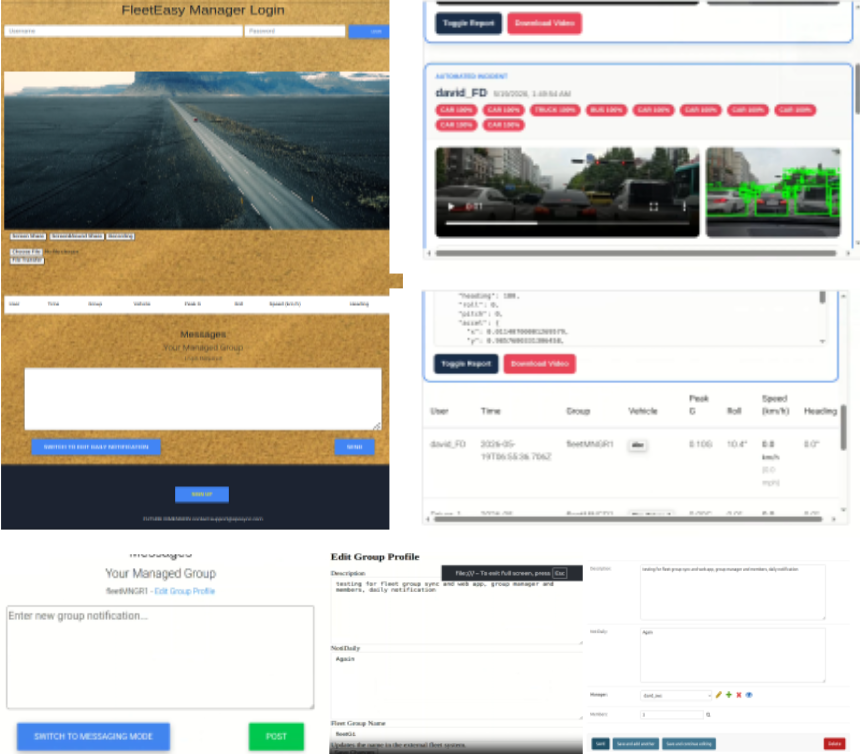
Manager Web Portal – Desktop operations hub (sposync.com/mngrlogin) with advanced group notification and administrative tools.
Permissions & Legal Information – Device permissions, privacy practices, and operational disclaimers.
2. LOGIN ( Driver & Manager )
🔓 Access Conditions Requirements
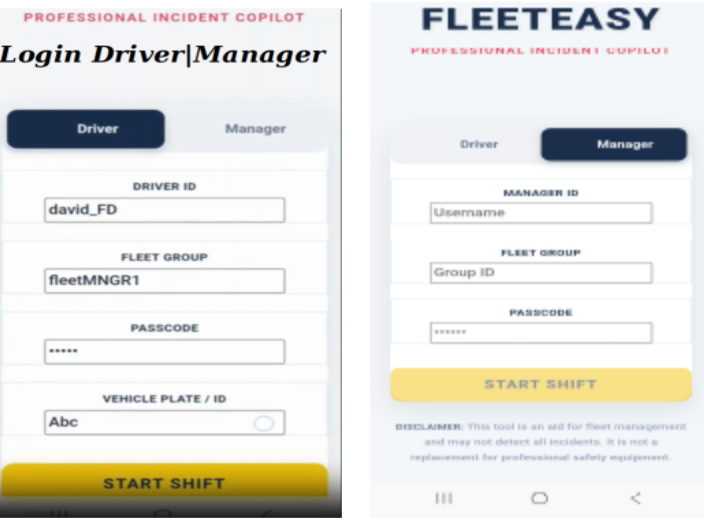
Before logging in, ensure the following requirements have been completed.
Account Registration: The following information must be provisioned through the FleetEasy Support Team driver account(s), manager account, fleet group name, fleet group passcode, and support contact: support@sposync.com. Open and closed test participants are assigned predefined Vehicle IDs such as fieldplate and simplate which are used internally for testing and evaluation purposes. Do not modify or replace these identifiers unless specifically instructed by FleetEasy Support.
Subscription: Individual users must complete account registration and activate an eligible FleetEasy subscription before accessing operational features.
Permission and Disclaimer: All required permissions and legal acknowledgements must be accepted before FleetEasy can operate correctly. Refer to Section 5 for additional information.
3. MAIN PANELS (DRIVER vs. MANAGER)
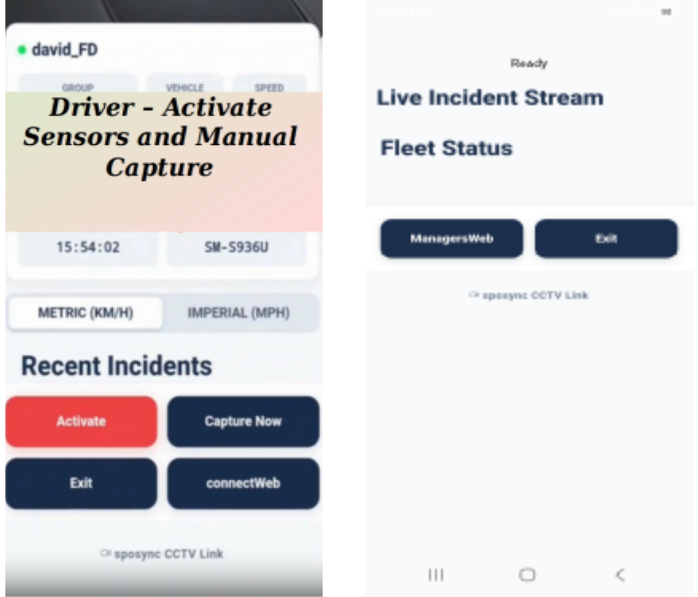
🚛 Driver Dashboard
The Driver Dashboard provides video preview, live vehicle telemetry, activate sensors and manual capture buttons.
Video Preview: The device camera preview automatically activates immediately after login, providing continuous visual monitoring of the driving environment.
Live Vehicle Telemetry: When sensors are activated, FleetEasy displays live telemetry information including vehicle speed, heading and direction, motion analytics, and Impact-related sensor information.
Activate Button: enables all required smartphone sensors used by FleetEasy's accident detection and evidence synchronization system.
Manual Capture Button: A Manual Capture generates the same Evidence Bundle used for automatic accident events including video recording, AI-generated image snapshots, and Telemetry data. Unlike automatic incidents, Manual Captures are stored locally and can be shared using preferred communication platforms such as email, messaging applications and social communication platforms.
Recent Incident Reports: When FleetEasy detects a qualifying accident event, an Evidence Bundle is automatically generated and displayed within the Driver Dashboard. The bundle is simultaneously synchronized to designated Fleet Managers or Group Leaders for immediate review.
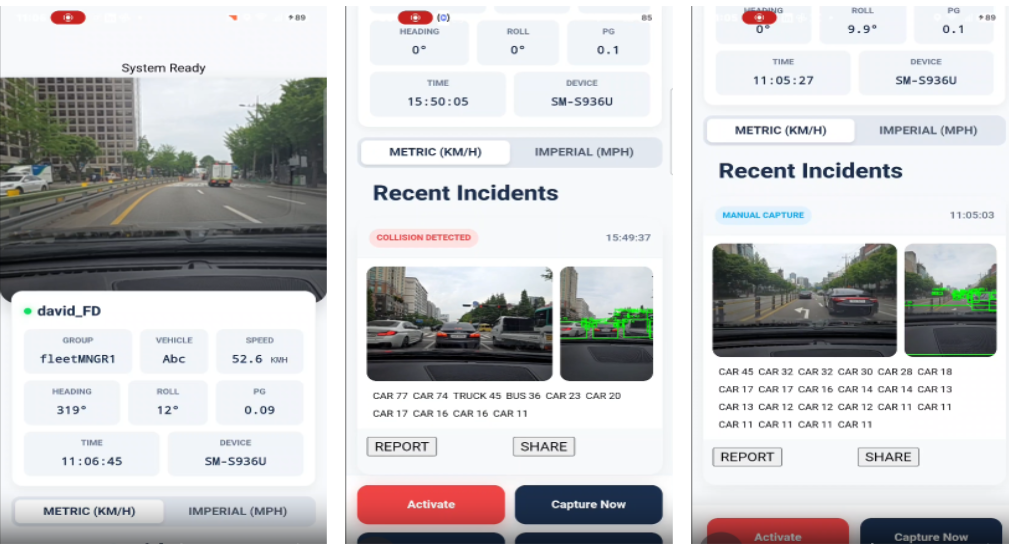
📊 Manager Dashboard
The Manager Dashboard provides mobile access to fleet activity, vehicle telemetry, and synchronized incident reports.
Fleet Status: Monitor fleet telemetry data from each driver when drivers login or are in near-miss and accident events.
Managers Web Button: Managers can open the web app like in the desktop environment to monitor fleet status and to receive automated incident bundles depicted in the following section. This enables managers to continue monitoring fleet operations while away from the office using the same account credentials.
Live Incident Stream: When an accident is automatically detected, the associated Evidence Bundle appears at the top of the Manager Dashboard, This allows immediate access to incident video, object-detected snapshot, and telemetry reports.
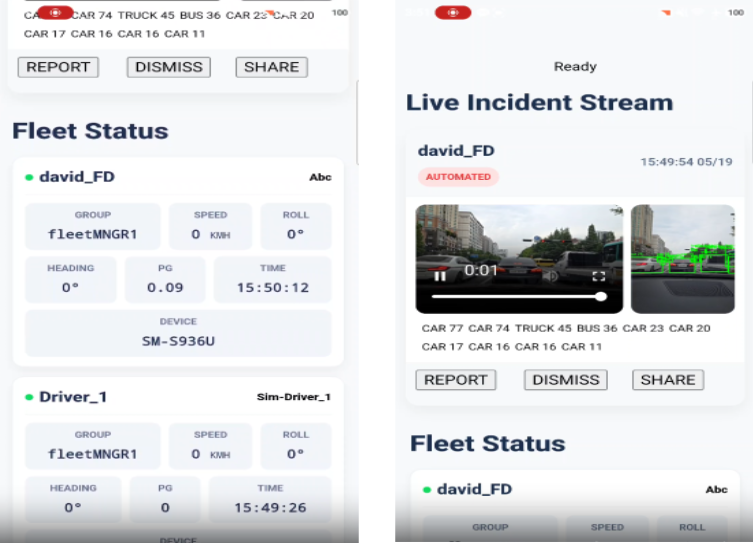
4. WEB APPLICATION OVERVIEW
The FleetEasy Manager Portal – https://sposync.com/mngrlogin, serves as the primary desktop environment for fleet monitoring, incident management, and administrative operations. Managers can access the portal using the same credentials assigned during registration.
Fleet Status: View real-time telemetry information for all registered fleet members when drivers login or are in the situation of near-miss and accident events.
Automated Incident Reports : Evidence bundles generated by drivers are automatically synchronized to the manager panel and portal and displayed at the top of the operational dashboard.
Periodic Notification: Managers may create and maintain group-specific notifications to communicate operational updates, reminders, or safety information.
Administration Tasks: Managers can add or edit fleet group specific notes and group name. Administrative tasks such as adding or removing members are managed through the dedicated administration portal – https://sposync.com/groupadmin. Access is available following registration approval.
5. PERMISSIONS & LEGAL DISCLAIMER
⚙️ Required Device Permissions
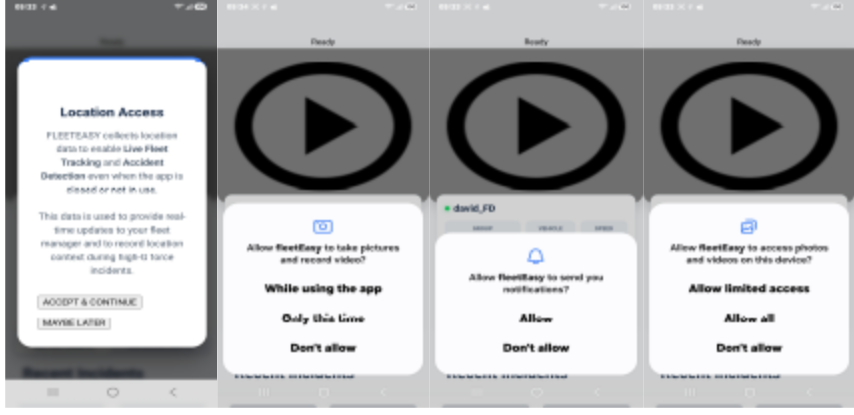
The application will prompt you for access to specific device hardware features. Rejecting these prompts will break core accident detection solutions.
Location (Always On): Required for vehicle speed calculations, directional heading, GPS coordinates, accident location tracking, and post-impact movement.
Camera / Storage: Required for video recording, image capture, AI object detection, and evidence Bundle generation
Notification Access: Required for fleet alerts, group communications, and administrative announcements
File and Folder Access: Required for secure local storage of Evidence Bundles including video recordings, AI-generated snapshots, and telemetry reports. These files may then be shared through approved communication applications.
⚖️ Legal Disclaimer
The application will prompt you for access to specific device hardware features. Rejecting these prompts will break core accident detection solutions.
Intended Use: FleetEasy is designed as a driver assistance and fleet management solution. While the platform utilizes advanced detection technologies, it may not identify every incident or hazardous event. FleetEasy is not a substitute for professional safety systems, driver training, or legally required vehicle safety equipment.
Privacy and Data Protection: Evidence Bundles containing videos, images, and incident reports are stored locally on the user's device and are not permanently retained within FleetEasy cloud services. Only essential telemetry and operational data may be synchronized for fleet management, analytics, and dispute-resolution purposes.
Notification Access: Required for fleet alerts, group communications, and administrative announcements
Safe Operation: Drivers must never interact with the FleetEasy application while operating a moving vehicle. Any configuration changes, status updates, or manual evidence captures should only be performed when the vehicle is safely parked and stationary. FleetEasy promotes responsible driving practices and safe vehicle operation at all times.